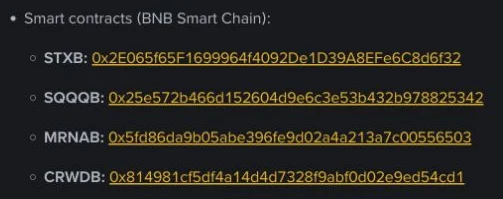
Before you move a bStock to a wallet, don't go by the logo and don't stop at the company name. Three things have to line up: the exact ticker, BNB Smart Chain, and the full contract address. Miss one and you cannot say that the token showing in your wallet is the asset you meant to hold.
The step looks fussy and it is cheap insurance. The same company can exist in tokenized versions from different issuers, and a search will happily return tokens with similar names that have nothing to do with Binance bStocks. Names and icons can be copied; the full contract address on chain is what identifies one specific token.
Sort the three addresses out first
The mix-up that costs money is reading "contract address" as "the address I send to". They do completely different jobs, and once you add the platform deposit address there are three to keep apart:
| Address | What it is for | The mistake people make |
|---|---|---|
| Binance deposit address | The receiving address when you send an asset back into your own platform account | Copying it before the right token and network have been selected |
| Your own wallet address | The receiving address of a BSC wallet you control | Going by how the address looks, without confirming the network and that the wallet supports it |
| Token contract address | Identifies one specific bStock on BSC | Treating it as a personal receiving address and sending tokens straight to it |
Never use a token contract address as your receiving address. A contract address is the asset's ID; it is not your door number. The recipient of a real transfer is either your own compatible BNB Smart Chain wallet address, or the deposit address the platform shows for that token at that moment.
One token, one contract, and no master address
In its 2026-09-02 announcement covering a batch of new bStocks, Binance listed a BNB Smart Chain contract for each of four tickers separately, under the heading Smart contracts (BNB Smart Chain): STXB, SQQQB, MRNAB and CRWDB. Four tickers, four entirely different addresses. The screenshot at the top shows them as Binance published them, but only as an image: this article deliberately does not type any of those strings out as text, because an address copied out of an article is one hand-off more than you need. Read them off the announcement itself.
That list is not a directory of contracts to bookmark, either. It is a snapshot of one announcement on one date, and what it demonstrates is the method: pin down the exact ticker first, then find the official announcement and the current deposit and withdrawal page for that token. New assets, status changes and later updates all go by whatever the page says at the time you transfer.
Checking the first four and the last four characters is not verification. The characters in the middle are part of the address too; the wallet folds them away to save screen space, not to save you the work. The dependable version is to open the block explorer through the link in the official announcement, copy the full address there, and compare it character by character with the one your wallet is about to import. Don't take it via a search snippet, a screenshot from a group chat, or a table someone forwarded you.
The screenshot at the top of this page comes from that announcement. The two addresses above are copied from it too, so they only tell you what the announcement listed when it went out. For the contract's current status, balances and whether transfers are open, check the contract page on BscScan yourself; if BscScan asks for a human-verification check first, complete it and then look.
Four checks before you transfer
Don't act on the first result your wallet's search box offers. Fix the order of the checks and you are much less likely to skip one when you are in a hurry:
- One: confirm the asset. Find the exact ticker on the Binance bStocks page, and read the product and the issuer while you are there. The same company name does not mean the same asset on chain.
- Two: confirm the current page. Take the network and the contract address from that token's official Binance announcement or its current deposit and withdrawal screen. Third-party aggregator pages can point you in a direction; they don't replace the official source.
- Three: compare the full address, character by character. Open BscScan through the link the announcement gives, and read from the first character to the last. The first and last four, the token name, the logo: none of them are enough.
- Four: confirm the receiving end. The wallet has to support BNB Smart Chain. The minimum amount and the network fee shown on the withdrawal page change with the token and its current status, so read them live, and send a small test first if circumstances allow.
A test transfer is a safety habit, not a recovery mechanism; it does not mean a wrong address can be reversed. If the first one doesn't show up correctly, stop and check the network, the contract and the wallet settings. Don't send a second one to see whether it gets through.
BSC is not the same thing as EVM
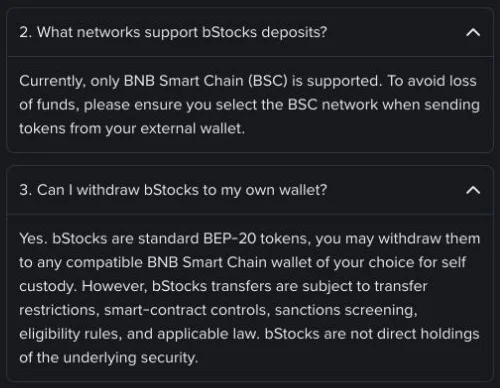
Binance's FAQ on bStocks deposits and withdrawals was updated 2026-07-29. On the network question, the page read:
"Currently, only BNB Smart Chain (BSC) is supported. To avoid loss of funds, please ensure you select the BSC network when sending tokens from your external wallet."
And on withdrawing to a wallet of your own, in the single answer that grants it and limits it:
"Yes. bStocks are standard BEP-20 tokens, you may withdraw them to any compatible BNB Smart Chain wallet of your choice for self custody. However, bStocks transfers are subject to transfer restrictions, smart-contract controls, sanctions screening, eligibility rules, and applicable law. bStocks are not direct holdings of the underlying security."
Ethereum and BSC are both in the EVM world, and a wallet address on one can look identical to an address on the other, but they are not the same chain. A similar address format does not make Ethereum usable here, and what xStocks or some other tokenized product supports doesn't carry over to bStocks. What counts during the operation is the network listed on that token's current page.
There is a second distinction underneath this one. "The wallet supports a chain" and "the platform supports this particular transfer" are different statements. A wallet that can switch to BSC and import a contract only proves the front end is able to read that chain; whether the platform has the withdrawal or the deposit open for that token is a separate layer of status. The route is connected only when both ends check out.
Showing up in your wallet is not a return ticket
Once a bStock is added to your wallet and the balance displays, that proves one thing: this wallet can read the token on that chain. It does not mean you hold the underlying stock, and it does not mean you can move the token back to the platform, trade it or redeem it at any time you like. If you want the product differences straight first, read bStocks vs xStocks: issuer, chain and dividends compared
The reverse holds as well. A balance that doesn't appear automatically hasn't vanished from the chain, and importing some contract with a matching name is not the fix. Cross-check your own wallet address against the official contract on BscScan first, then decide whether you are looking at a display problem, the wrong network, or an asset that was never the same one. Until the evidence lines up, don't send more.
The restrictions in that FAQ answer are worth taking literally. Transfers stay subject to smart-contract controls, sanctions screening, eligibility rules and applicable law. The issuer can restrict addresses it finds to be out of compliance and block transfers through a contract blacklist, and while a corporate action is being processed, deposits, withdrawals and conversion between token and share can be suspended as well.
So "withdrawable to a compatible BSC wallet" is a conditional ability, not an unlimited pass. The longer you hold, the more the issuer, the custody arrangement and the disposal conditions belong in your risk list; that part continues in Tokenized stocks: what happens to your money if the issuer fails. If a suspension, a delisting or a corporate action actually lands, work through the official arrangements item by item with Tokenized stock delisted? What holders get back after a halt or delisting
Don't transfer while any of this is true
- The current withdrawal page doesn't list the token, or shows its status as suspended.
- The network on the page is not BNB Smart Chain, or the chain you were about to use is a different EVM chain.
- The address in the official announcement, the BscScan page and the full contract shown in your wallet don't match.
- The company name looks the same, but the ticker, the product or the issuer is different.
- The asset is in a corporate action, under maintenance, in an eligibility review, or otherwise restricted.
More addresses will be announced over time; each check runs in the same order: exact ticker, then the official Binance announcement, then the BscScan contract page linked from that announcement, then the current deposit and withdrawal page. When all four agree, confirm the receiving wallet and the network; if any one of them disagrees, stop. Tokens sent over the wrong network or into a contract address are usually very hard to get back.
What was checked, and when
Sources checked 2026-09-12. The network and wallet limits come from Binance's bStocks deposit and withdrawal FAQ; the address examples come from the 2026-09-02 announcement covering four bStocks; the point that one company can exist in versions from different issuers comes from the Stock Hub announcement. The second link points to an English page on one of Binance's regional sites; treat it only as the source text. Which region the link sits under says nothing about whether users there, or where you live, can use the product.
Five things people still mix up before transferring
Is there one contract address that covers all bStocks?
No. Every bStock has to be checked by its exact ticker, against that token's official announcement and its current deposit and withdrawal page. There is no "bStocks master address" that stands in for them.
Can I withdraw bStocks over Ethereum or Solana?
Per the Binance FAQ updated 2026-07-29, what can be confirmed officially is that bStocks deposits support only BNB Smart Chain, and that standard BEP-20 bStocks may be withdrawn to a compatible BNB Smart Chain wallet. Nothing in that lets you infer that Ethereum, Solana or any other network works, and the current withdrawal page for the specific token is still what governs the operation.
If my wallet search turns up a bStock with the right name, can I just transfer it?
No. The name and the logo are not enough to verify anything. You still have to match the exact ticker, the issuer, the BNB Smart Chain network and the full contract address.
Once they are in my own BSC wallet, can I always move them back to Binance?
Not guaranteed. The FAQ states that bStocks transfers remain subject to transfer restrictions, smart-contract controls, sanctions screening, eligibility rules and applicable law, and corporate actions or the platform's current conditions can affect transfers, deposits, trading and redemption.
Why is the deposit address different from the contract address?
The deposit address is the receiving address the platform shows for your account; the contract address identifies one specific token on BSC. They serve different purposes, and a contract address must never be used as a personal receiving address.