You place a buy limit order, hit confirm, and it shows as filled straight away. Most of the time the price was set on the wrong side. A buy limit above the current price, or a sell limit below it, doesn’t sit and wait. The exchange matches it right away against orders already on the book, and the fill usually lands near the current price, not at the number you typed.
If you want to buy after the price drops, the limit goes below the current price. Selling is the reverse, so the limit goes above it. Put it on the wrong side and the order is no longer a resting order; it becomes a trade that executes immediately. On a popular coin that usually just means you bought earlier than planned. On a small coin with a thin order book, it can mean an average fill well above the current price.
A limit price means “pay at most this much”
Binance’s help center has a ready-made example in its explainer on market and limit orders: with the current price at 2,400, a buy limit order at 1,500 won’t execute until the price drops to 1,500 or below. A buy limit at 3,000 is above the current price, so it fills immediately, at around 2,400 rather than 3,000.
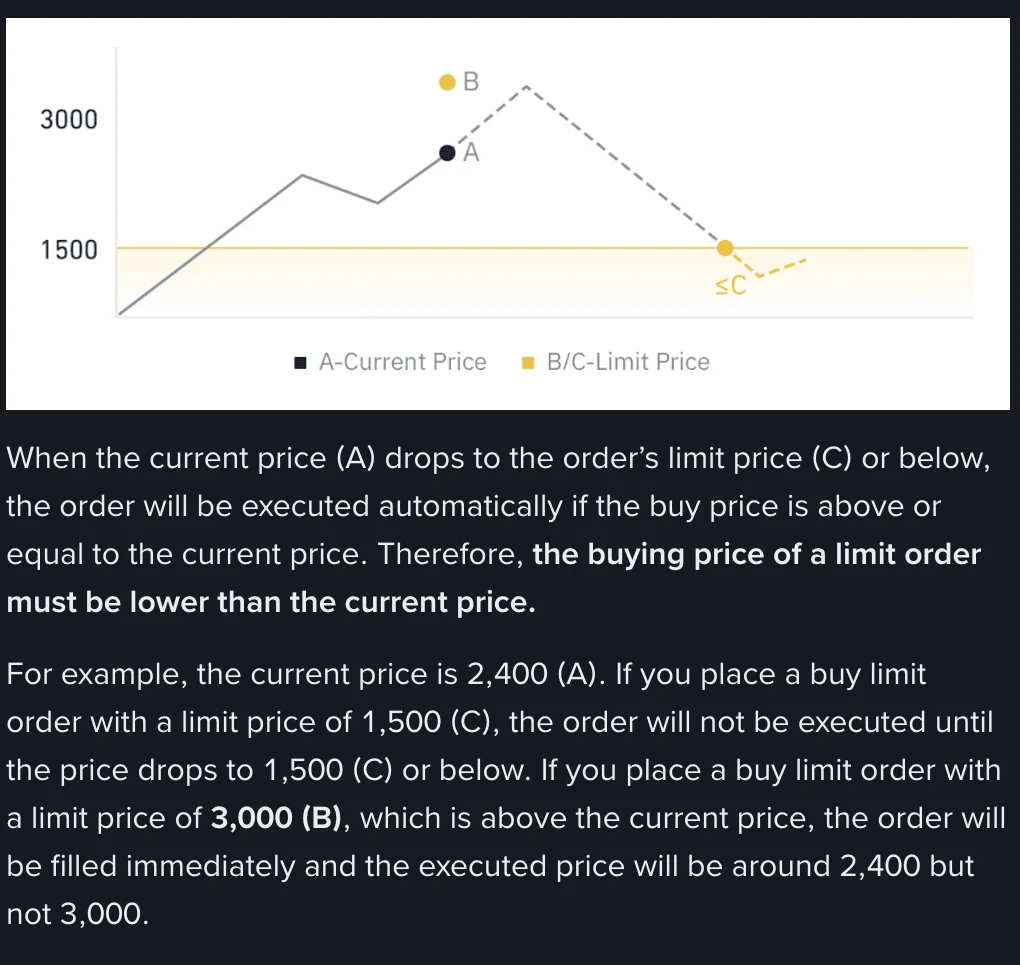
Why around 2,400 and not 3,000? The matching engine pairs orders from the best price to the worst. A buy at 3,000 tells the system “I’ll take any sell order up to 3,000.” The cheapest sell order on the book (the best ask) is sitting near 2,400, so the system starts there and works upward until your quantity is filled or it reaches the 3,000 level.
So for a buy order the limit is a ceiling. The fill price can only be equal to it or lower. For a sell order it’s the other way round. The limit is a floor, and the fill can only be equal to it or higher. If a standard limit order isn’t completely filled, the remaining quantity stays on the order book at your limit price.
Which side of the price does a buy or sell limit go on?
That Binance page says: “the buying price of a limit order must be lower than the current price.” For a sell, the limit price has to be above the current price. As a table:
| What you want | Where the limit goes | If it’s on the wrong side |
|---|---|---|
| Buy after a pullback | Below the current price | Fills immediately, buying from the best ask upward |
| Sell after a rise | Above the current price | Fills immediately, selling from the best bid downward |
Strictly speaking, what decides whether a buy fills straight away is the best ask; for a sell it’s the best bid. The last traded price is usually very close to both, so “current price” is good enough most of the time. When the market is jumping around, I look straight at the best bid and best ask.
What an instant fill costs you: fees or fill price?
Fees first. The maker is the side whose order goes onto the order book first and waits for someone to trade against it. The taker is the side whose order executes immediately, without resting on the book first. Binance’s help article on makers and takers is blunt about it. Using a limit order does not guarantee you’ll be the maker, and market orders, as well as IOC and FOK limit orders, are always taker. The part of a wrong-side limit order that fills at once counts as taker.
According to Binance’s fee page (checked September 2026), regular users (VIP 0) pay 0.100% on spot for both maker and taker. So if you’re a regular spot user and put the price on the wrong side, you haven’t paid anything extra in fees. Futures are different, because maker and taker rates aren’t the same there. Look up the numbers for your own tier on Binance’s fee schedule. I won’t list them here, since they change by tier.
The real cost is in the fill price. Popular coins have deep order books, and the orders sitting at the best ask are enough to fill you, so the fill lands near the current price. On a thin small coin, each level holds only a little, and a large order eats through the book one level at a time. Here’s an illustrative order book:
| Ask level | Price | Size on the book |
|---|---|---|
| Ask 1 | 10.00 | 100 |
| Ask 2 | 10.20 | 100 |
| Ask 3 | 10.50 | 100 |
| Ask 4 | 11.80 | 500 |
You meant to wait for a dip, but placed a buy limit at 12.00 instead. Average fill price = total cost across the levels ÷ quantity filled:
- Buying 300 units: (10.00×100 + 10.20×100 + 10.50×100) ÷ 300 = 3,070 ÷ 300 ≈ 10.23, about 2.3% above the 10.00 “current price” you were looking at.
- Buying 800 units: the first three levels give you 300 units for 3,070, then 500 units from Ask 4 cost 5,900. (3,070 + 5,900) ÷ 800 = 8,970 ÷ 800 ≈ 11.21, about 12.1% above 10.00.
A 12.00 limit only means you won’t pay more than 12.00. If the order still isn’t filled by the time it reaches 12.00, whatever is left sits at 12.00 and fills there when a seller turns up. It does nothing to stop you eating your way up the book.
How to stop an order from filling the moment you place it
- Glance at the order book. A buy limit should be below the best ask, and a sell limit above the best bid. After typing the price, check which side it falls on before you confirm.
- Tick “Post Only”. This option makes sure the order goes onto the order book first instead of immediately taking an order on the other side. Binance’s help center says it’s currently only offered on the web and desktop platforms, so if you trade from your phone you’ll need to double-check the price yourself.
- Count the digits on the confirmation screen. One extra digit in the price, say a buy at 10.5 typed as 105, and the order executes the moment you confirm. One extra digit in the quantity makes the order ten times bigger, and if the price is also on the wrong side, it eats through several more levels. Check the decimal point on both price and quantity.
If you’re not sure about a new coin’s order book, my advice is to place a small order well away from the current price first and check that it stays put under Open Orders. Once you’ve confirmed that, cancel it and place the real order as planned.
The price never hit my limit. Why did it fill?
There’s also the opposite case. The side is right, the limit is some distance from the current price, and the order fills anyway. Work through the checks below in order and you’ll usually find the cause.
- A wick swept through your price. In a fast market, price can spike to your level and come back within seconds, and you’d never tell from the current price afterward. Open the 1-minute chart, look for a long wick reaching your price around the time of the fill, and compare it with the time and price in your trade history. For how to read wicks, see How to read candlestick charts · 5 patterns.
- It was actually a partial fill. If the order status says Partially Filled, the price really did touch your level, but there wasn’t enough volume traded at that price to fill the whole order. The rest is still sitting in your open orders.
- It wasn’t a plain limit order. Take-profit and stop-loss orders all have a trigger price, and the limit versions also have a separate order price. Only when the trigger price is hit does the order turn into a limit or market order and go out to fill. If you think of it as a plain limit order, it looks as if it moved before your price was reached. What actually happened is that the trigger price was hit first.
- The price has an extra digit. Go to your order history and read the price you submitted exactly as it was entered. A wrong quantity won’t make an order fill early, but it will make the fill bigger.
A common use for limit orders is placing a take-profit. For where to put the take-profit and how to pair it with a stop, see Risk-Reward Ratio: How to Calculate It, What’s Good. If you’re placing orders on futures, leverage magnifies the extra you pay on a wrong-side fill, so read What is Leverage? Why most new traders die here before you trade.
FAQ
Does a buy limit set above the current price fill at my price?
Usually not. The system fills you starting from the lowest sell order on the book, and on a liquid coin the fill lands near the current price. The example in Binance’s help center: with the current price at 2,400, a buy limit at 3,000 fills immediately at around 2,400. The limit is only the most you are willing to pay; on a thin order book, a large order can eat its way up to somewhere close to your limit.
Is a limit order always a maker order?
Not necessarily. Binance’s help center states that using a limit order does not guarantee you will be the maker: an order that fills immediately without first entering the order book is a taker. To make sure the order rests on the book first, tick “Post Only”, which Binance says is currently only available on web and desktop.
If a spot limit order fills instantly, do I pay higher fees?
For regular Binance users (VIP 0), spot maker and taker fees are both 0.100% (checked September 2026), so at that tier you are not paying extra in fees. What to watch is the fill price. Futures maker and taker fees are not the same; check Binance’s fee schedule.
Where should I set a sell limit order?
The opposite of a buy: the order price has to be above the current price for the order to rest and wait for the price to rise. Set it below the current price and it sells on the spot, starting from the best bid and working down.
The price never reached my limit, but the order filled. How do I check?
First look at the 1-minute chart for a wick that touched your price, and compare it with your trade history. Then check whether it was a partial fill, or an order created when a take-profit or stop-loss triggered. Last, check whether the price has an extra digit. A wrong quantity will not make an order fill early, but it will make the fill bigger.